
Lab work runs on trust. Doctors, researchers, and patients all rely on samples being collected, labeled, stored, and reported without mistakes.
Yet studies show that most laboratory errors happen around the sample itself, often before analysis even begins. The good news is many of these mistakes are preventable when labs modernize how they manage samples.
This guide looks at common sample handling errors and how better workflows, LIMS, and laboratory sample management software help avoid them.
Key Takeaways
- Most lab errors start with the sample, not the analyzer. Mislabeling, missing tubes, and fragmented data cause more trouble than the instruments themselves.
- A good laboratory sample management software becomes your single source of truth. It tracks every tube, standardizes workflows, and gives you real-time visibility and audit-ready records.
- Small changes add up fast. Map your workflow, add barcodes, automate repetitive steps, and train your team—each step moves your lab closer to safer, lower-stress operations.
What Causes Most Laboratory Errors?
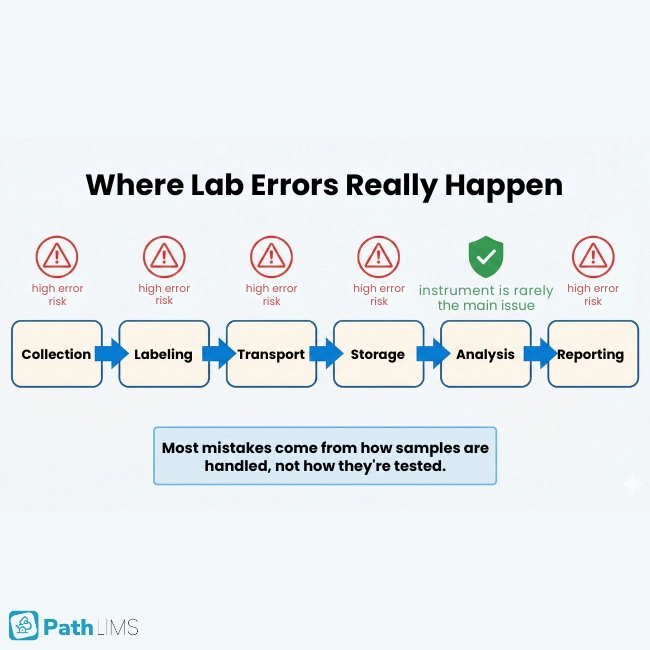
Several studies highlight that the majority of lab errors happen outside the analyzer. They cluster in pre‑analytical and post‑analytical steps such as collection, labeling, transport, and reporting.
Many errors appear long before a sample reaches an analyzer, during collection, labeling, transport, and storage. These pre‑analytical slips can trigger misdiagnosis, repeat testing, and serious patient harm.
Most modern labs already run high‑quality instruments. Today’s mistakes usually come from manual logistics and information transfer rather than the analysis itself.
They also summarize research showing that automation in the pre‑analytical phase can dramatically cut error rates and reduce biohazard exposure events. In short, human‑heavy workflows are where labs are most vulnerable.
Common Mistakes in Lab Sample Handling
Sample handling issues show up in almost every type of lab. Pathology, clinical diagnostics, research, and biobanking all face similar patterns.
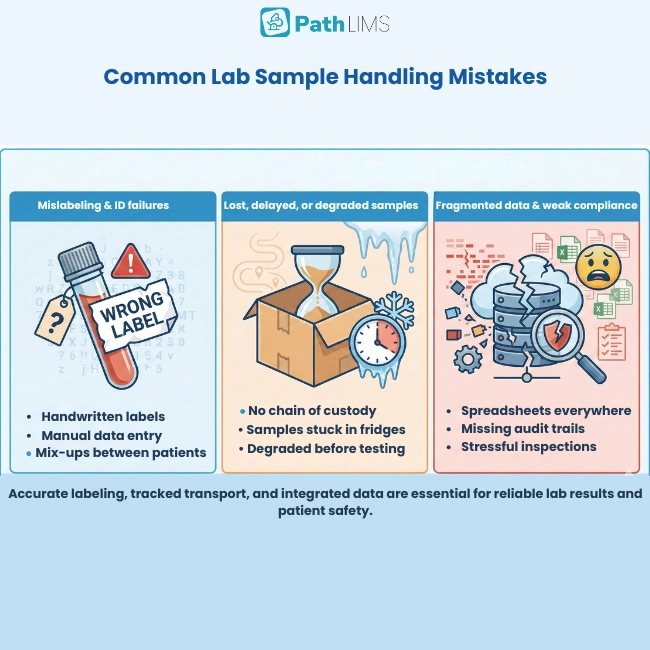
Mislabeling and identification failures
Incorrect labeling and identification remain some of the most damaging mistakes. A single mislabeled tube can attach the wrong results to the wrong patient, with obvious risks.
Manual data entry and handwritten labels add even more risk. Every time staff copy data between forms, spreadsheets, and systems, small slips can quickly become big problems.
Lost, delayed, or degraded samples
High sample volumes and manual tracking make it easy to misplace or lose specimens. Without reliable chain‑of‑custody records, teams waste time searching for samples instead of testing them.
Many scientists report spending more time reconciling data and hunting for samples than doing actual science. In the worst cases, specimens degrade while staff comb through spreadsheets and emails to confirm their status.
Fragmented data and siloed systems
In many labs, sample information is scattered between LIMS, ELNs, spreadsheets, email threads, and instruments. When chain of custody, QC status, and storage location live in different tools, reconstructing history becomes slow and error‑prone.
Outdated systems also make collaboration and reporting harder. Teams cannot easily share data, track projects, or see the full picture, which raises the risk of mistakes.
For a deeper look, Sapio Sciences explains four ways your sample management system can quietly derail your lab’s potential and what to change next.
Compliance gaps and weak audit trails
Poor quality control and documentation quickly become regulatory risks. Missing audit trails, inconsistent SOPs, and manual record‑keeping all make inspections stressful and increase the chance of non‑compliance.
Labs operating under GLP, CLIA, or ISO frameworks struggle when their sample management system cannot embed compliance. Preparing for audits then turns into a manual scramble across multiple systems.
Why Laboratory Sample Management Software Matters
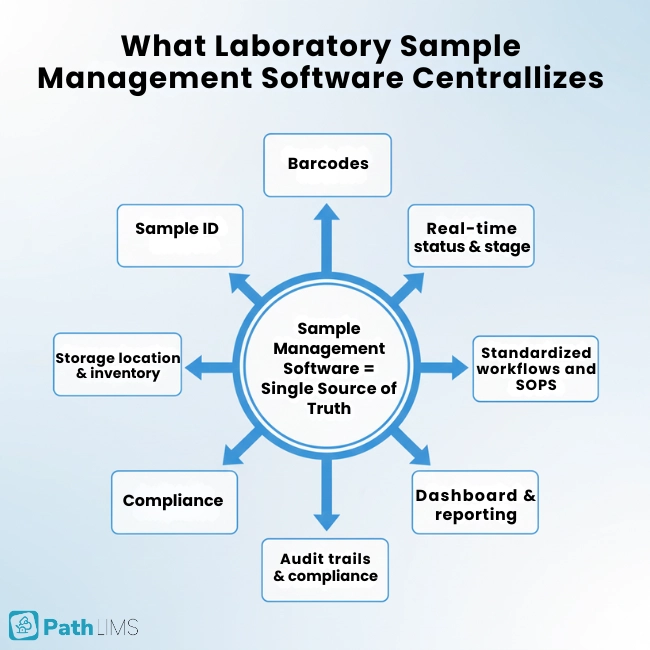
At its core, laboratory sample management software connects digital tracking to what happens at the bench. It captures and manages sample data in real time, from collection to disposal.
A well‑designed platform keeps identification, location, and status in one place while enforcing quality standards and reducing manual work. Modern systems cover labeling, processing, archiving, and tracking, often using barcodes, automation, and standardized workflows to keep samples visible and under control.
In simple terms, laboratory sample management software gives your team a single source of truth for every sample. It replaces scattered spreadsheets and sticky notes with structured, auditable data.If you are still comparing options, our guide to choosing a LIMS can help you shortlist platforms that actually fit your lab’s workflows.
How LIMS and Sample Tracking Reduce Errors
Laboratory information management systems (LIMS) and dedicated lab sample management modules tackle several root causes of errors. They combine tracking, automation, and standardization.
Real‑time laboratory sample tracking
Modern sample management software tracks the full lifecycle of each specimen. It spans labeling, storage, testing, and final disposal while maintaining a clear chain of custody.
With real‑time tracking, teams can see where a sample is, which stage it has reached, and how long it has been there. This visibility reduces loss, exposes bottlenecks, and keeps turnaround times on track.
When unique sample IDs are linked to patient or study records, accurate tracking also helps prevent mix‑ups and supports safer clinical decisions.
Standardized workflows and enforced SOPs
Standardized procedures and quality control across pre‑analytical, analytical, and post‑analytical phases are essential. Good lab management systems enforce SOPs, provide validation rules, and keep audit trails.
Automated sample management can embed compliance into every step. Instead of relying on memory, scientists follow guided workflows that live in the system.
Software that respects medical laboratory SOPs also helps reduce variation between operators and sites, improving consistency.
Automation with orchestration and scheduling
Automation delivers the biggest gains when it is paired with orchestration software. Scheduling tools connect instruments, robots, and people so information flows reliably between every step.
Liquid handlers, robotics, and workflow software reduce manual pipetting, repetitive transport, and data transcription. Less repetitive work means fewer fatigue‑driven errors and faster turnaround times.
A modern lab management system also improves data analysis and reporting. Automated dashboards make it easier to spot patterns, monitor KPIs, and act quickly when something drifts out of range.
Automation Errors: What Labs Should Watch For
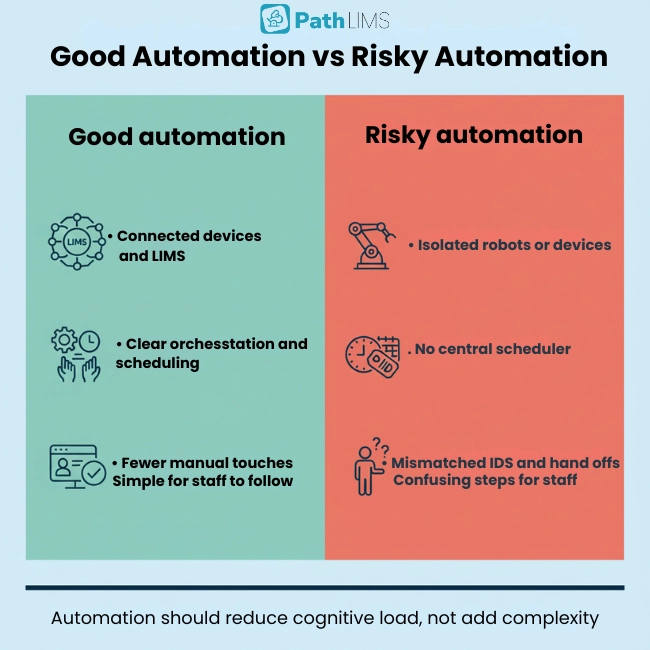
Automation is powerful, but not magic. Partial automation can initially increase error rates if systems are poorly integrated or communication is weak.
New tools can introduce mistakes when devices, software, and people are not synchronized. Failed handoffs, mismatched IDs, or duplicated steps can creep in when orchestration is missing.
To avoid this, labs need clear workflow design, central scheduling, and robust data integration. Automation should reduce cognitive load, not add extra complexity.
GMP Requirements and Quality‑Focused Sample Management
Labs working under GMP, CLIA, or ISO standards must prove that their processes are controlled. That includes how they handle specimens.
Sapio emphasizes the need for GMP‑ready LIMS that embed compliance. They mention capabilities such as audit trails, change tracking, and role‑based access.
CloudLIMS explains how diagnostic lab management systems support internal quality control and external assessments. They help labs document every step, participate in proficiency testing, and maintain regulator‑ready records.
Confidence highlights how a laboratory management system improves traceability, documentation, and process consistency. Together, these features help labs satisfy regulators while cutting operational risk.
Steps to Improve Sample Workflows in Real Labs
You do not need to overhaul everything at once. Practical, staged changes can make sample handling safer and more efficient.
1. Map your current sample lifecycle
Start by mapping how samples move today. Include collection, labeling, transport, storage, analysis, reporting, and long‑term archiving.
Use this map to highlight where samples are most often delayed, misplaced, or mislabeled. Compare these weak points with the phases where studies show most errors arise.
2. Centralize sample data in one system
If your team uses multiple spreadsheets and tools to answer simple questions about a sample, you likely have a data fragmentation problem. Sapio and Sonic Solutions both warn that scattered data increases error risk.
Move toward a single platform for sample identifiers, storage locations, QC status, and history. This could be a full LIMS or dedicated laboratory sample management software.
3. Introduce barcoding and digital chain of custody
CloudLIMS recommends barcode‑based tracking to reduce manual entry errors. CrelioHealth and Ligolab echo this with examples of unique sample labeling and tracking.
Even a small lab can start by assigning machine‑readable IDs and capturing every transfer in software. This builds a defensible, searchable chain of custody for each sample.
4. Automate repetitive, error‑prone steps
Use automation where humans get tired or rushed. Biosero highlights repetitive pipetting, sample transport, and manual transcription as high‑risk tasks.
Consider liquid handlers, automated workcells, and orchestration tools. Begin with the steps that create the most rework, then expand as your team gains confidence.
5. Build accessible, user‑friendly lab dashboards
Sample management systems should be easy for everyone to use. Design interfaces with clear labels, high‑contrast layouts, and keyboard navigation so all staff can work efficiently.
Use dismissible UI alerts for things like temperature excursions, missing steps, or expiring samples. Staff should be able to acknowledge a warning, see what to do next, and return to their work without confusion.
6. Protect consent, privacy, and security
As more sample data flows through digital systems, privacy and consent matter. LIMS and lab management platforms typically include access controls, audit logs, and secure portals.
Use these features to honor patient consent, protect sensitive data, and track who viewed or changed records. Clear governance builds trust with clinicians, sponsors, and regulators.
7. Train people and monitor metrics
Technology only helps when people use it well. CloudLIMS and Confidence both highlight staff training as a key part of quality control.
Confirm that everyone understands new workflows, knows how to scan labels, and can interpret dashboards. Track KPIs such as sample loss, relabeling, turnaround time, and repeat tests to measure progress.
Difference Table
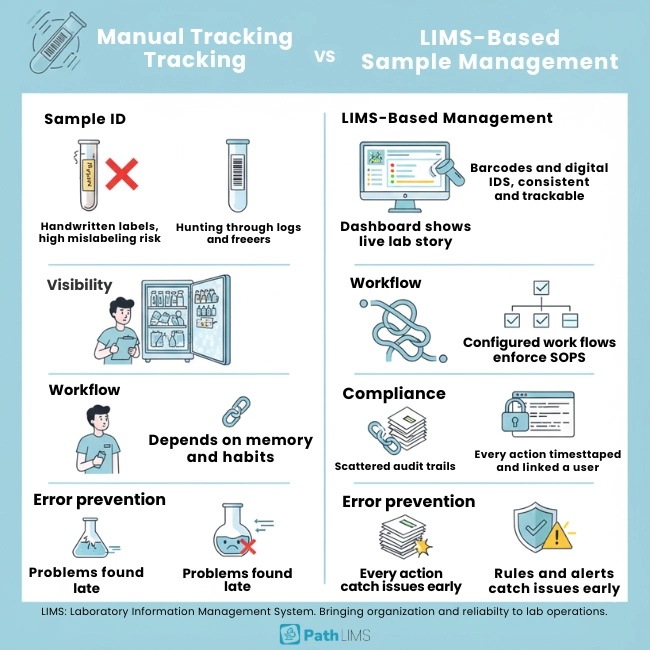
| Aspect | Manual sample tracking | LIMS-based sample management |
|---|---|---|
| Sample identification | Handwritten labels and spreadsheets increase mislabeling risk. | Barcodes and digital IDs keep labeling consistent and traceable. |
| Visibility | Staff hunt across logs, emails, and freezers to find samples. | Dashboards show live location, status, and history for every sample. |
| Workflow control | Steps depend on memory and personal habits. | Configured workflows guide users and enforce SOPs automatically. |
| Compliance | Audit trails are incomplete, scattered, or missing. | Every action is timestamped and linked to a user for inspections. |
| Error prevention | Problems surface late, once results look wrong. | Validation rules and alerts catch issues earlier in the lifecycle. |
FAQs
1. What is laboratory sample management software?
Laboratory sample management software is a system that records and tracks the full lifecycle of samples. It handles labeling, storage, testing, and disposal while maintaining chain‑of‑custody records and supporting compliance.
2. What causes most laboratory errors?
CloudLIMS and Biosero show that many errors happen in manual pre‑analytical and post‑analytical steps. These include collection, labeling, transport, and result reporting rather than the analysis itself.
3. How does a sample tracking LIMS reduce mistakes?
Sample tracking LIMS solutions use barcodes, automated workflows, and audit trails. They give teams real‑time visibility into sample status, reduce manual data entry, and standardize how specimens move through the lab.
4. Can automation introduce new lab errors?
Yes, if automation is only partial or poorly integrated. Biosero notes that error rates can rise when devices and software do not communicate well. Orchestration and thoughtful workflow design are essential.
5. How does this support GMP and regulatory compliance?
Modern LIMS and lab management platforms embed SOPs, documentation, and audit trails into everyday work. They make it easier to meet CLIA, ISO, and GMP expectations without manual record‑chasing.
6. Is a free lab management system enough?
Some labs start with a free LIMS or basic lab tracking system. These tools can help, but growing organizations usually need more configurable, integrated laboratory management software as complexity increases.
Build Safer Sample Workflows, One Step at a Time
Lab errors are not a fact of life. Studies referenced by CloudLIMS and Sapio suggest that many mistakes are preventable with better visibility, monitoring, and control.
By mapping your workflows, centralizing data, using barcodes, and adopting laboratory sample management software, you can dramatically reduce risk.
Pair these tools with automation, accessible interfaces, and strong quality culture. Your team gains time for science, and patients gain confidence that every result reflects the true story of their sample.
If you found this guide helpful and want automation that feels effortless, choose PATHLIMS for smart device integration and near‑zero sample handling errors. Contact our team to schedule a demo.
Table of Contents
- Key Takeaways
- What Causes Most Laboratory Errors?
- Common Mistakes in Lab Sample Handling
- Why Laboratory Sample Management Software Matters
- How LIMS and Sample Tracking Reduce Errors
- Automation Errors: What Labs Should Watch For
- GMP Requirements and Quality‑Focused Sample Management
- Steps to Improve Sample Workflows in Real Labs
- Difference Table
- Build Safer Sample Workflows, One Step at a Time